

API mocking saves time and simplifies development. It lets you simulate APIs without waiting for the backend, enabling teams to work independently, test edge cases, and reduce costs. Here's how it helps:
Speeds Up Development: Frontend and backend teams can work in parallel using mock APIs.
Tests Edge Cases: Simulate errors like timeouts, server failures, and authentication issues.
Cuts Costs: Avoid infrastructure expenses and third-party service fees during development.
Improves Testing: Create a stable environment to test responses without relying on live systems.
Tools like ReqRes make API mocking easy. With features like system-wide traffic monitoring, response overrides, and local file mapping, ReqRes helps developers debug and test efficiently. Because it works on the traffic your app really sends, your mocks start from actual responses instead of hand-written guesses.
To get started, define your mock endpoints, align them with production APIs, and document them clearly. Incorporate mocks into your CI/CD pipeline to ensure consistent testing and smooth workflows.
Benefits of API Mocking
API mocking helps streamline workflows and improve productivity, making it easier for teams to collaborate and deliver projects efficiently.
Speed Up Team Workflows
With API mocking, teams can work on different parts of a project simultaneously. For example, frontend developers can start building features using mock endpoints while backend developers focus on implementing the actual APIs. This parallel approach keeps projects moving smoothly and avoids delays in complex workflows [1].
Test Edge Cases and Errors
Mock APIs allow developers to test scenarios that are hard to replicate in live systems. These scenarios include:
Authentication failures
Network timeouts
Server errors
Rate limiting responses
Data validation issues
By simulating these situations, teams can identify and fix potential problems early, ensuring the application runs smoothly even under unexpected conditions.
Reduce Development Costs
Using API mocking can significantly lower development expenses.
"One of the primary reasons companies adopt API mocking is the cost savings it offers. By mocking services, you avoid the expenses associated with setting up or utilizing actual services during the early stages of development." [1]
| Cost Area | Savings Impact |
|---|---|
| Infrastructure | No need for dedicated testing environments |
| Third-party Services | Avoids fees for external services during development |
| Development Time | Speeds up workflows and reduces delays |
| Error Prevention | Fixes problems early when they’re less costly |
API Mocking with ReqRes
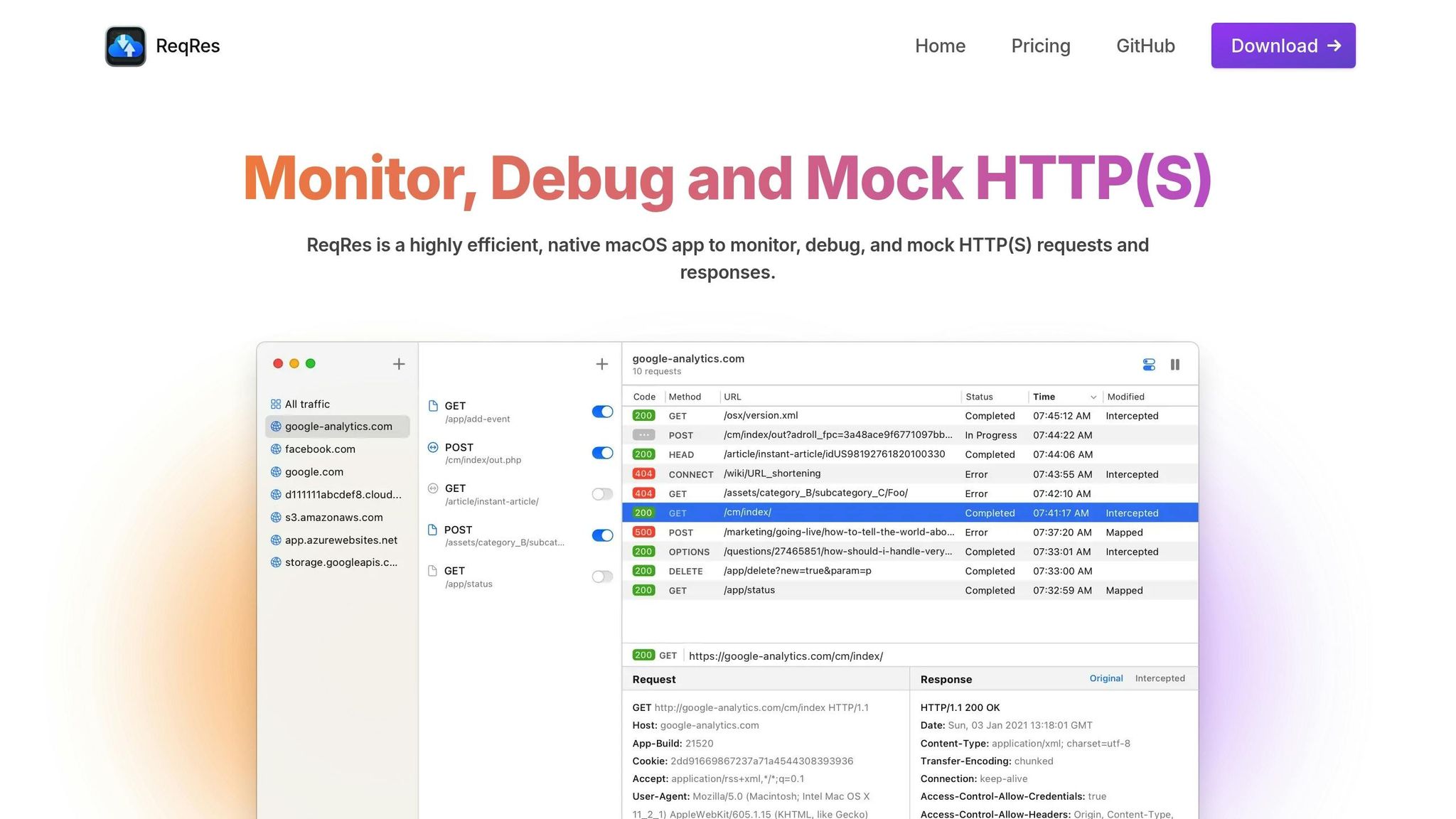
ReqRes simplifies API mocking with its macOS-native application by starting from the traffic your app already sends. Instead of standing up a separate mock server, you capture real requests and change what comes back.
Key Features of ReqRes
ReqRes is a native web-debugging proxy for macOS (14.6 or later) that captures HTTP(S) traffic system-wide through a macOS Network Extension, so your apps and browsers show up with no proxy settings to configure. Command-line tools that ignore the system proxy, such as node scripts and Go programs, need an HTTPS_PROXY environment variable pointed at ReqRes. Here’s what it offers for mocking:
| Feature | Description | Benefits |
|---|---|---|
| Traffic Monitoring | Capture HTTP(S) requests and responses in real time, with method, URL, status, headers and body | See exactly what your app sends and receives |
| Response Overrides | Replace the status code, headers or body of a matching response | Test error paths against the real app |
| Local File Mapping | Answer a request with a file on disk using Map Local | Serve mock data and work offline |
| Breakpoints | Stop the next matching request and wait for you | Inspect a request before it goes out |
| MCP Server | Let an AI assistant read captured traffic and mock a captured response | Turn real responses into mocks, with your approval |
Rules can also add or change headers on a request. To see inside HTTPS traffic, you trust the ReqRes root certificate once.
Getting Started with ReqRes
Starting with ReqRes is straightforward. Follow these steps to set up and mock APIs effectively:
Capture Real Traffic
Start capture and use your app as normal. Add a host filter to scope the list to the API you are working on, and use the search bar (host:,method:,status:,path:) to find the call you want to mock.Simulate Authentication
Override the response of your login or session call with a401, a403, or any other status code to check how the app handles a rejected user.Modify Response Data
Map an endpoint to a local JSON file with Map Local, or override its body and status code, to build against data your backend cannot produce on demand, such as an empty list.Let Your Agent Build the Mock
Connect Claude Code, Claude Desktop, Cursor or any MCP client to the built-in MCP server and ask it to turn a captured response into a mock. Credential-shaped values are redacted before the agent sees them, and ReqRes asks for your approval before any change applies.
Since rules act on live traffic, you do not need to point the app at a different server or change the code under test. The free tier includes two host filters and one rule, which is enough to try this on a single endpoint.
Whichever tool you use, error responses are a good first thing to mock.
Creating Mocked Endpoints
Add Error Responses
You can simulate error responses by specifying HTTP status codes and error messages. Here are some examples:
Authentication errors: Return a
401status code with a message like "Authentication failed."Resource not found: Use a
404status code with details about the missing resource.Server errors: Return a
500-level status code to mimic backend issues.
To test timeout handling, many standalone mock servers also let you introduce response delays. For instance, a configuration like the following delays the response by 5000ms:
{
  "endpoint": "/api/users/timeout",
  "method": "GET",
  "delay": 5000,
  "response": {
    "error": "Request timeout",
    "status": 408
  }
}
These setups allow you to test how your API handles failures and slow responses, ensuring better preparation for real-world conditions.
API Mocking Guidelines
After creating your endpoints, follow these tips to ensure your mocks stay accurate and development runs smoothly.
Stay Aligned with Production APIs
Mocks should mirror your production APIs. Start by defining API contracts early in the design process to validate assumptions and test behaviors. This approach helps catch integration problems before they escalate.
Here’s how to keep mocks aligned with production APIs:
Version Control: Store mock definitions alongside your API specifications.
Contract Testing: Regularly check mocks against your API specs.
Routine Updates: Adjust mocks whenever production APIs are updated.
For generating dynamic data, use OpenAPI definitions to create realistic responses automatically. This ensures your mocked endpoints consistently reflect production schemas and formats.
Staying aligned with production APIs simplifies documentation and ensures effective testing.
Document Your APIs
Use OpenAPI specs to document your mocked APIs and improve team collaboration.
When documenting:
Define Specifications: Clearly outline endpoint behaviors, data formats, and authentication requirements.
Add Examples: Include sample requests and responses for common scenarios.
Highlight Limitations: Note any mock-specific constraints or behaviors.
Host your mock servers at the same path level as your production APIs. This minimizes the need for code changes when transitioning to production.
Use Mocks in Testing
Incorporate mocks into your CI/CD pipeline for consistent API validation. Create detailed mocks to simulate various scenarios, such as:
| Scenario Type | Example Cases | Testing Focus |
|---|---|---|
| Performance | High load, Timeouts | Response times, System stability |
| Error Handling | Network failures, Invalid data | Error recovery, User feedback |
| Security | Auth failures, Access control | Security protocols, Data protection |
Adding these mocks to your CI/CD process ensures continuous testing throughout the development cycle. This helps detect issues early and keeps your API functioning as expected while providing a smooth user experience.
Wrapping Up
API mocking plays a crucial role in today’s development workflows. Using proper mocking methods, teams can cut costs, speed up development, and reduce risks while maintaining high-quality output.
Tools like ReqRes make this process even smoother. With its native macOS design and no proxy settings to configure, it fits into existing workflows. Plus, features like real-time monitoring, response overrides and Map Local let you test error paths, empty states and other hard-to-reproduce scenarios against the real app - perfect for teams working on tight development timelines.
By combining the right tools with smart practices, teams can keep their development cycles efficient without sacrificing thorough testing. Here are some tips to get the most out of API mocking:
Ensure mock APIs stay aligned with production APIs.
Provide clear and detailed documentation for all endpoints.
Incorporate mocks into your CI/CD pipelines.
Regularly test edge cases and error responses.