
Change traffic
New in 1.1
Hold a request with a breakpoint
On this page
A breakpoint holds a matching HTTPS or plain http:// request before it reaches the server and waits for you. You send it on as it is, send it on with changes, or answer it with an error status. You can also let an agent answer held requests.
What holding a request costs
If nobody answers within 60 s, ReqRes sends the request on unchanged, as if it had never been held.
Aim each breakpoint narrowly. With no path or method set, it holds all requests to its host, including images, fonts and analytics calls.
Add a breakpoint
- Open Settings ▸ Breakpoints.
- In Host, type the host to hold, such as
api.example.com. - Optional: in Path contains, type text that must appear in the path, such as
/orders. - Optional: open the Methods menu and select the methods to hold. The default is Any method.
- Click Add Breakpoint.
- ReqRes checks each request that passes through it against your breakpoints. The host does not need a host filter, and the sidebar's selection does not matter.
- Host is an exact host, or
*.example.comfor its subdomains.*.example.comholdsapi.example.combut notexample.comitself. - You can paste a URL into Host:
https://api.example.comis read asapi.example.com. A path or query after the host is refused, and the note says where it goes: "Enter the host on its own — “/v1/orders” belongs in “Path contains”." - Text no request's host can hold, such as 2 hosts with a comma between them, is refused: "ReqRes cannot match “api.example.com, www.example.com”. Use a host like api.example.com or localhost, or *.example.com for its subdomains." A breakpoint that holds the same requests as one in the list is refused too: "That rule is already in the list."
- The note goes away as soon as you change any field, or remove the breakpoint it is about.
- A port is ignored, in the breakpoint and in the request: a breakpoint on
api.example.comholds a request toapi.example.com:8443. - A breakpoint on
localhostholds only requests that reach ReqRes. Browsers and Electron apps never sendlocalhostto a proxy, and a terminal set up with the environment lines skips it. See Capture command-line tools and agents. - Path contains is plain text, not a pattern, and ignores case. It is matched anywhere in the path and query, so
/ordersholds/orders/42and/v2/orders. - A breakpoint applies to requests that start after you add it, on new connections and open ones alike. A request already in flight is not held.
Each breakpoint in the list has a switch and a Remove button. The top of the pane says how many breakpoints are armed, with Turn All Off beside the count.
Answer a held request
When a request matches, the Paused Requests panel opens. It floats above other apps and does not take the keyboard until you click into it.
- The top shows the method, the host, the path and the seconds left. At zero it shows "Resuming…".
- Below them it reads: "Held before it reaches host. If the timer runs out it is resumed untouched."
- The Headers tab lists the request's headers, and its label counts them, such as "Headers (7)". You can change a header's name or value in place, except in the locked rows below. Add Header adds a row, and the minus button at the end of a row removes that header.
Content-LengthandTransfer-Encodingshow a lock in place of the minus button and cannot be edited. They describe the body, so the app's own go with the app's own body, and a replacement body gets aContent-Lengthcounted from it. A row you add or rename to either name is refused, and Resume with Changes stays unavailable until you remove it.- A dot marks each row you change. Revert appears once you edit, and puts the headers and body back as they arrived.
| Button | What it does |
|---|---|
| Resume | Sends the request on unchanged. |
| Resume with Changes | Replaces Resume after you edit. Sends the request with your headers, and with your body if you replaced it. |
| Abort | Answers the request with the status picked beside the button. The request never reaches the server. |
Abort offers 400, 401, 403, 404, 408, 409, 429, 500, 502, 503 and 504. The default is 409 Conflict. The app receives an empty response with that status and the header X-Req-Res-Aborted: breakpoint. The request stays in the traffic list as an Aborted row: "Aborted at a breakpoint, answered 409."
- The panel's buttons have no keyboard shortcuts, and they stay inactive for a moment after the panel opens. A keystroke or click meant for another app cannot answer it.
- Closing the panel sends all held requests on: "Closing this panel resumes everything held, untouched."
- Once the panel has the keyboard, Esc closes it, and closing resumes everything held. While you are editing a header or a body, the first Esc only ends the editing and keeps what you typed. Press Esc again to close the panel.
- If a page hangs and you cannot see the panel, click ReqRes in the Dock. See A page hangs and no panel shows.
Read or replace the body
ReqRes holds a request as soon as its headers arrive, and it does not show the body. The Body tab says what the request declares instead:
| Body tab | What the request declares |
|---|---|
| "Body (76 bytes, not shown)" | A body of that size, from its Content-Length. |
| "Body (not shown)" | A body sent in chunks, or no size: over HTTP/2 a request can carry a body without declaring one. |
| "Body (empty)" | No body: Content-Length: 0, or over HTTP/1.1 neither Content-Length nor Transfer-Encoding. |
Resume sends the original body unchanged. To send a different one:
- In the Body tab, click Replace Body….
- Type the body to send. Until you type something, Resume still sends the original.
- Click Resume with Changes.
- The tab then reads "Body (replaced)". ReqRes sends your text with a
Content-Lengthcounted in bytes and noTransfer-Encoding. - Nothing of the original reaches the server. For a request with a body, the note under the editor says: "With a replacement, none of the original goes to the server: what has arrived of it, and whatever the app still sends, is read and dropped."
- Keep Original Body closes the editor and forgets what you typed.
- A TRACE request may not carry a body, so its Body tab has no Replace Body… and says: "A TRACE request may not carry a body, so this one cannot be given one here: over HTTP/1.1 ReqRes answers a TRACE with a body 502 instead of forwarding it." A TRACE that arrives with a body of its own gets that 502 when you resume it over HTTP/1.1, and the panel says so. Abort answers it in the panel instead.
Handle several held requests
Several requests can be held at once. They queue oldest first, and each has its own countdown.
- The panel's title shows the count, such as "3 Paused Requests".
- A strip under the summary lists each held request with its method, the last part of its path and the seconds left. A pencil marks one you have edited. Hover over one for its full URL, and click it to show it.
- Resume All appears when more than 1 request is held. It sends all of them on unchanged.
- The panel holds up to 25 requests. Past that, ReqRes sends further matches on unchanged, and the panel says how many.
Turning off or removing one breakpoint while another stays on does not release a request it already holds. When no breakpoint is left switched on, ReqRes resumes all held requests unchanged.
Let an agent answer held requests
A connected agent can always see what is held, with the list_paused_requests MCP tool. It gets each held request's method, URL and headers, with credential-shaped values redacted, and a line saying what the request declares about its body. It never gets the body. Answering is a separate permission:
- Open Settings ▸ Breakpoints.
- Under Agents, turn on Let agents answer held requests. It is off by default.
With it on, an agent can resume, edit or abort a held request with answer_paused_request. Like you, it can send a body in place of the original without seeing the original, and it cannot set or remove Content-Length or Transfer-Encoding. A body for a TRACE is refused.
When an agent answers the last held request, the panel stays open and says what the agent did:
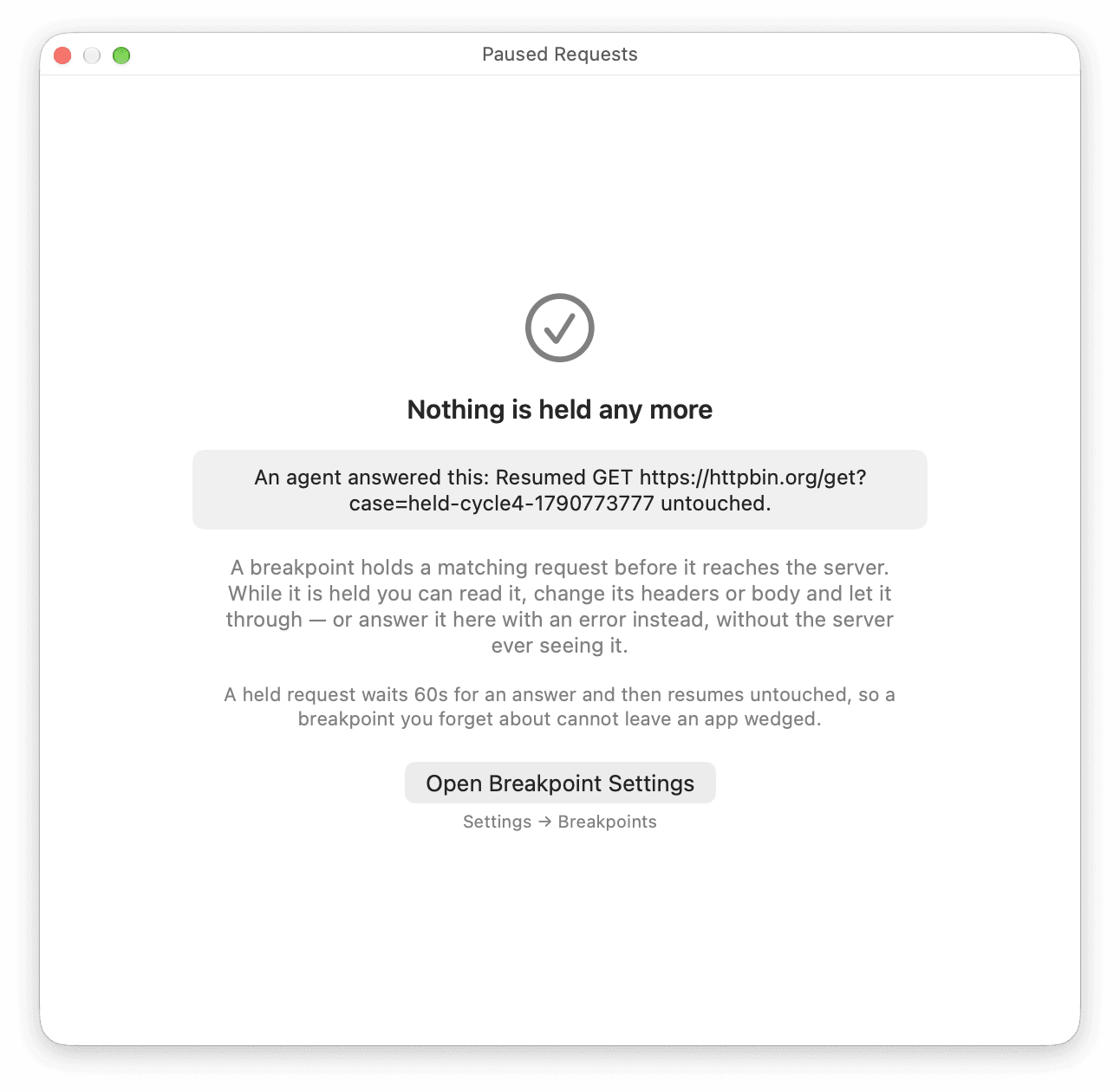
- ReqRes does not ask you to approve each answer. An approval panel can wait up to 45 s of the 60 s a held request has, so this switch is the approval.
- To take the permission back, turn the switch off: "Turning this off is immediate — the next decision is refused and the request stays yours to answer."
- ReqRes writes each answer it acts on to Settings ▸ MCP ▸ Activity, and each one it refuses because the switch is off. The entry masks credential-named values, including those in the URL's query. The agent's reply masks the URL the same way, unless you send that host unmasked. See Review and undo agent changes.
- Agents can never create a breakpoint.
Breakpoint limits
- Breakpoints hold requests, not responses.
- Nothing is held while ReqRes is not receiving capture, such as while it reconnects to a capture that kept running after ReqRes quit unexpectedly. A matching request then goes through, because nobody could answer it. A request held before ReqRes went away comes back to the panel once it reconnects, with what is left of its 60 s. See ReqRes quit while capturing.
- An excluded host is never held, over HTTPS or plain
http://. See Pass a host through untouched. - ReqRes never holds a connection it relays without decrypting: HTTPS before the ReqRes certificate is trusted, a host macOS pins, or an app that refused ReqRes's certificate for that domain. See Trust the ReqRes certificate and Keep SSL-pinned apps working.
- A matching rule's request headers are applied before the request is held. The panel shows the request as it would go out.
- If a Map Local rule, or an Override rule with a body, matches the held request, the panel shows the app's own headers and Resume answers with the rule's response. Your edits are ignored, because nothing goes to the server.